Introduction: The Fresher's Journey
Starting your career in IT can be both exciting and daunting. With so many technologies, frameworks, and job roles available, it's easy to feel overwhelmed. But the key to success is having a structured approach. This comprehensive guide will walk you through each step of the process, from choosing your career path to acing your interviews.
💡 Important: As a fresher, your focus should be on building a strong foundation, creating practical projects, and presenting your skills effectively through a well-crafted resume. Consistency in learning is more important than trying to learn everything at once.

Freshers following a structured approach have 3x higher chances of getting placed
Step 1: Choose Your Career Path (Very Important)
Before you start learning everything, it's crucial to decide your direction. Trying to master all technologies at once will lead to confusion and dilute your focus. Instead, choose one primary career path and become really good at it.
👉 Key Advice: Once you choose a path, study only what matters for that role. This targeted approach will make you more employable than having superficial knowledge of multiple domains.
Popular Fresher Career Paths
1. Software Developer
Java / Python / Full Stack development. Most in-demand role with opportunities in both product and service companies.
2. Frontend Developer
React / Angular / Vue.js. Focus on creating user interfaces and web applications with modern frameworks.
3. Backend Developer
Spring Boot / Node.js / Django. Build server-side logic, databases, and APIs for web and mobile applications.
4. Data Analyst / Scientist
Python / R / SQL / ML. Analyze data, create visualizations, and build predictive models for business insights.
5. QA / Automation Tester
Selenium / JUnit / TestNG. Ensure software quality through manual and automated testing processes.
6. Cloud / DevOps
AWS / Docker / Kubernetes. Entry-level roles in cloud infrastructure and deployment automation.

Choose your path based on interest, market demand, and learning curve
Step 2: What a Fresher Should Study (Core Topics)
Once you've chosen your career path, it's time to build a strong foundation. Here are the essential topics you need to cover, regardless of your chosen specialization.
🔹 Programming Language (Pick ONE first)
- Java - Most preferred for service companies and enterprise applications
- Python - Great for data science, automation, and backend development
- JavaScript - Essential for web development (both frontend and backend)
Must Know Concepts: Variables, loops, conditions • OOP concepts (Classes, Objects, Inheritance) • Exception handling • Collections / Data structures basics
🔹 Data Structures & Algorithms (Basic → Medium)
Focus on logic and problem-solving, not competitive coding. You don't need to solve 1000 problems; 100 well-chosen problems are enough.
- Arrays & Strings
- Linked List
- Stack & Queue
- HashMap / Set
- Recursion basics
- Searching & Sorting algorithms
🔗 Best Practice Platforms
LeetCode
Company-specific questions
HackerRank
Beginner-friendly challenges
GeeksforGeeks
Detailed explanations
🔹 Frameworks (Role-based)
- Java Developer → Spring Boot, Hibernate, REST API
- Frontend Developer → HTML, CSS, JavaScript, React/Angular
- Database → MySQL / PostgreSQL (CRUD operations, joins, indexing)
- Version Control → Git & GitHub (essential for all developers)
Step 3: Build Projects (This Gets You Interviews)
📌 Important: Projects are more important than certificates for freshers. They demonstrate your practical skills and problem-solving ability. A good project portfolio can compensate for lack of experience.
Fresher Project Ideas
1. Job Portal Website
Create a platform where job seekers can search and apply for jobs, and employers can post openings.
2. Student Management System
Manage student records, grades, and attendance with admin and student portals.
3. E-commerce Backend API
Build REST APIs for product catalog, user authentication, cart, and order processing.
4. Blog Application
Create a full-stack blog with user registration, article creation, comments, and likes.
Each Project Should Include:
- Problem Statement - What problem does your project solve?
- Tech Stack - List all technologies used
- GitHub Link - Clean, well-documented code
- Live Demo - Hosted version (optional but recommended)
- README File - Clear instructions to run the project

Freshers with 2-3 good projects get 50% more interview calls
Step 4: How to Start a Fresher Resume
Your resume is your marketing document. As a fresher with limited experience, you need to structure it to highlight your strengths - skills, projects, and potential. Standard Word documents often break formatting in ATS systems. We strongly recommend using LaTeX.
🏆 Recommended Template: "Jake's Resume"
This is the #1 most recommended resume template by recruiters and software engineers worldwide. It is clean, single-column, ATS-friendly, and professional.
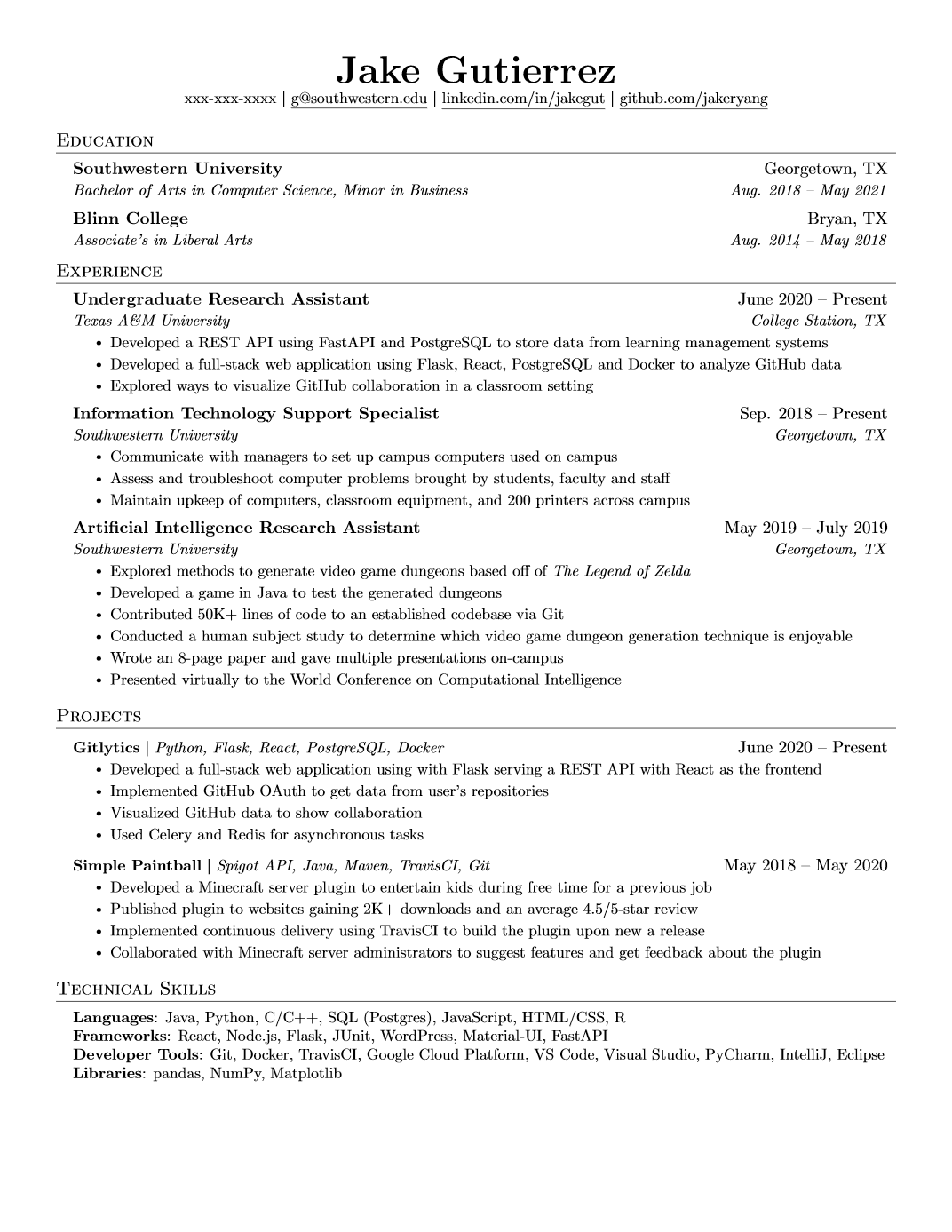
Why this template?
- ATS Friendly: Parsers can read it easily (99% success rate).
- Clean Design: No wasted space or distracting graphics.
- Standard Fonts: Uses professional serif/sans-serif fonts.
*Overleaf is an online editor. You don't need to install anything. Just create an account and start editing!
Ideal Fresher Resume Structure
Header
Name, Email, Phone, GitHub, LinkedIn (make sure links work!)
Career Objective
2–3 lines, role-focused. Mention what you bring to the table.
Technical Skills
Categorized (Languages, Frameworks, Tools, Databases)
Projects
MOST IMPORTANT SECTION. Describe 2-3 projects in detail.
Education
Degree, University, Year, CGPA (if above 7.5/10)
Internships
Any training or internships (even if unpaid)
Certifications
Relevant online courses (Coursera, Udemy, etc.)
Achievements
Hackathons, coding competitions, publications
⚠️ Avoid These Common Mistakes:
Don't Include
- Photos (unless specifically requested)
- Fancy designs and colors
- Irrelevant hobbies (like "reading books")
- Long paragraphs - use bullet points
- Objective statements like "To secure a challenging position..."
Do Include
- Action verbs (Developed, Implemented, Optimized)
- Quantifiable results where possible
- Keywords from job description
- Links to GitHub and live projects
- Clear section headings
Step 5: ATS-Friendly Resume Tips
Most companies use an Application Tracking System (ATS) to filter resumes. If your resume isn't ATS-friendly, it might never be seen by a human.
- Use Simple Fonts - Arial, Calibri, Times New Roman (10-12pt)
- One Column Layout - Multi-column layouts confuse ATS
- Keywords from Job Description - Mirror the language used in the job posting
- No Tables, Icons, or Graphics - ATS cannot read images or complex formatting
- Standard Headings - Use "Work Experience" not "My Journey"
- File Format - PDF or DOCX (some ATS work better with DOCX)
- No Headers/Footers - Information in headers/footers might not be parsed
Check Your ATS Score Here:
Resume Worded
Free ATS checker with detailed feedback
Jobscan
Compares resume with job description
Zety
Resume builder with ATS optimization
Novoresume
Templates and ATS compatibility check

ATS-friendly resumes have 80% higher chance of being seen by recruiters
Step 6: Best Websites for Preparation
The internet is full of resources for learning and job preparation. Here are the best platforms categorized by their purpose.
📘 Learning Platforms
freeCodeCamp
Free coding tutorials and projects
Udemy
Affordable courses (wait for sales)
Coursera
University courses with certificates
YouTube
Free tutorials (CodeWithHarry, Apna College)
🧠 Interview Preparation
InterviewBit
Company-wise interview questions
Pramp
Free mock interviews with peers
Glassdoor
Company reviews and interview experiences
AmbitionBox
Salary insights and company information
Step 7: Where Freshers Should Apply for Jobs
Knowing where to apply is as important as being prepared. Here are the best platforms and strategies for fresher job applications.
BCV World
Highly Recommended: Your one-stop destination for career guidance, interview preparation, and latest tech updates.
Best for networking and company research. Use "Open to Work" feature.
Indeed
Large job database. Set up email alerts for fresher roles.
Naukri
Popular in India. Regularly update your profile for better visibility.
Wellfound (AngelList)
Startup jobs. Freshers often get more responsibility in startups.
Pro Tip: Apply directly on company career pages (Infosys, TCS, Accenture, Wipro, etc.). These often have dedicated "fresher" or "campus" hiring sections. Also check out "Hiring Challenge" platforms like HackerEarth and TechGig.
Step 8: Daily Preparation Plan (2–3 Hours)
Consistency is key when preparing for job interviews. Even 2 hours daily, if done consistently, can make you job-ready in 3-4 months.
| Time | Task | Focus Area |
|---|---|---|
| 45 min | Coding practice | LeetCode / HackerRank (2-3 problems) |
| 45 min | Core concepts | DSA, System Design basics, DBMS |
| 30 min | Project work | Add features, fix bugs, improve documentation |
| 15 min | Resume / LinkedIn | Update achievements, connect with recruiters |
| 15 min | Job applications | Apply to 3-5 relevant positions |
💯 Remember: Consistency > Motivation. It's better to study 2 hours daily than 10 hours on weekends. Create a schedule and stick to it.
✨ Final Advice for Freshers
The journey from campus to corporate can be challenging, but with the right approach, you can land your dream job. Here's my final advice:
Start Now
Don't wait to be "perfect". Start applying when you're 70% ready. You'll learn more during interviews.
Network Actively
Connect with seniors, alumni, and professionals on LinkedIn. Referrals increase interview chances by 10x.
Embrace Rejections
Rejections are part of the journey. Each "no" brings you closer to a "yes". Learn from every interview.
Quality Over Quantity
2-3 good projects are better than 10 simple ones. Focus on projects that solve real problems.
Iterate Your Resume
Update your resume after every rejection. Tailor it for each application based on job description.
Master Fundamentals
Companies test fundamentals more than frameworks. Strong basics help in learning any technology faster.
The Fresher Success Formula
Skills + Projects + Resume + Consistency = Job Offer
Start Your Journey Today!
Small steps taken daily lead to big offers. The perfect time to start was yesterday. The second best time is now. Pick one step from this guide and start working on it today.
Print / Save Guide as PDF
Comments